
Introduction
Every SDSU student logs into MySDSU dozens of times a semester without ever getting a straight answer about what the portal actually does or why it keeps asking for a second login code. That confusion sends thousands of students to Google every month searching for “sdsu canvas student login,” “sdsu microsoft login,” and “sdsu degree evaluation login” — three completely different systems that all connect back to the same account.
MySDSU (officially written my.SDSU) is San Diego State University’s Student Information System. It replaced the old WebPortal system and now handles everything from financial aid to class registration to your official transcript, all behind a single sign-on.
In this guide, you’ll learn exactly what MySDSU is, how it evolved from the old WebPortal, and how it connects to Canvas, your SDSU email, and Microsoft 365. You’ll also get a step-by-step login walkthrough, answers about SDSU admissions timelines and bursar’s office contact info, and a myths-vs-facts section that clears up the confusion students post about on Reddit. By the end, you’ll be able to navigate the portal like someone who’s used it for four years, not four days.
Table of Contents
- What Is MySDSU?
- The History and Background of MySDSU
- Key Features of MySDSU
- Why MySDSU Matters for Every SDSU Student
- How to Log Into MySDSU — Step by Step
- MySDSU Myths vs Facts
- Expert Tips and Best Practices for Using MySDSU
- Frequently Asked Questions About MySDSU
- Final Verdict
What Is MySDSU?
MySDSU is San Diego State University’s official Student Information System (SIS) — the central hub where students, faculty, and staff manage nearly every academic and financial task tied to the university. Think of it as the control panel for your entire college career: registration, billing, financial aid, grades, and graduation applications all live in one place instead of scattered across a dozen different websites.
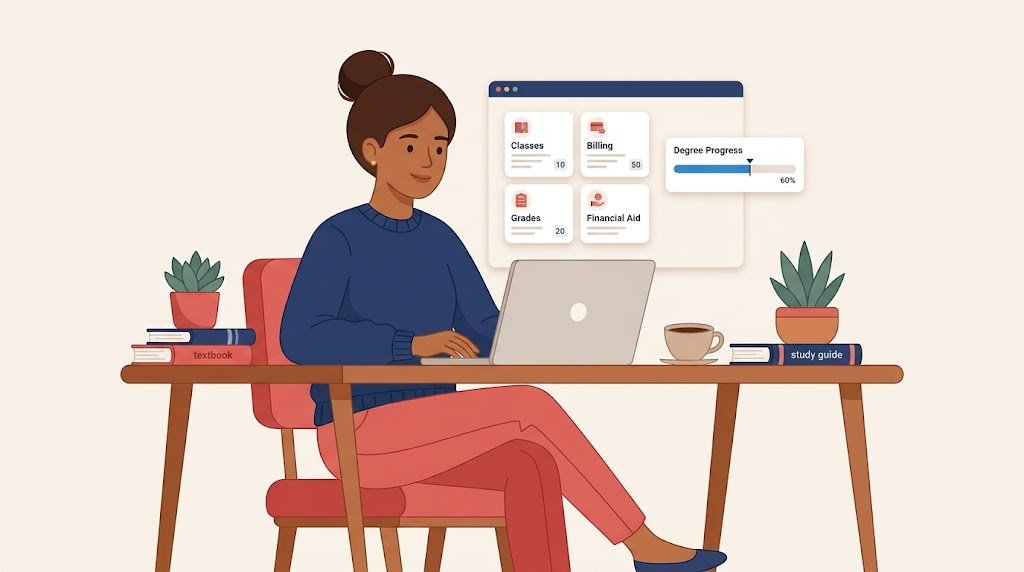
The portal runs on a system called PeopleSoft Campus Solutions, the same backbone used by all 23 campuses in the California State University (CSU) system. That’s an important detail, because it means MySDSU isn’t a custom SDSU invention — it’s part of a system-wide standard designed to make reporting and data-sharing consistent across every CSU school. If you transfer between CSU campuses, the layout of your new school’s portal will look strangely familiar.
Here’s a simple analogy: if your college experience were a house, MySDSU would be the front door with one master key. That single key — your SDSUid — unlocks the mailbox (your official email), the utility room (billing and financial aid), and the file cabinet (your transcript and degree evaluation). Before MySDSU, students needed separate logins for separate “rooms,” and a lot of that friction has now disappeared.
A quick real-world example: say you’re registering for spring classes, checking whether your financial aid disbursed, and downloading a tax form for your parents — all in one sitting. A few years ago, that meant three separate logins. Today, it’s three tiles on the same MySDSU homepage.
The History and Background of MySDSU
To understand MySDSU, it helps to know what it replaced. For nearly two decades, SDSU students logged into a system called WebPortal, a dated interface that handled registration and grades but felt increasingly clunky compared to modern student expectations. Anyone who attended SDSU before the transition remembers the maze of separate pages for financial aid, registration, and records.
SDSU officially launched my.SDSU as WebPortal’s replacement, moving the university onto the same PeopleSoft Campus Solutions platform used across the CSU system. According to SDSU’s Instructional Technology Services, the change was driven by two goals: aligning SDSU with the other 22 CSU campuses and enabling faster, more accurate institutional reporting for accreditation bodies like WASC.
The switch wasn’t just cosmetic. The new system introduced multi-factor authentication through Duo, a mobile-responsive design that actually works on a phone screen, and centralized task tracking so students can see outstanding to-dos — a missing financial aid document, an unpaid balance, a graduation application — from one dashboard instead of hunting through email.
This history matters for one practical reason: if you’re reading old forum posts, blog comments, or even outdated university PDFs that reference “WebPortal,” they’re describing the system MySDSU replaced. Some legacy WebPortal URLs (like sunspot.sdsu.edu) still exist and automatically redirect users to the current MySDSU login. If a bookmark or old link looks unfamiliar, that redirect is almost always why.
The rollout also changed how SDSU handles identity management campus-wide. Before the transition, students, faculty, and staff often had different usernames for different tools — one for email, another for the library, a third for registration. The SDSUid consolidated all of that into a single identity tied to your @sdsu.edu address, and MySDSU became the front-facing home for that identity. Faculty and advisors got their own version of the portal too, with tools to view advisee degree evaluations, process enrollment overrides, and manage service indicators, which is part of why advising conversations became noticeably faster once both sides were looking at identical data in real time.
It’s also worth understanding that MySDSU didn’t appear in isolation. The CSU Chancellor’s Office pushed for system-wide modernization partly because of WASC accreditation recommendations, which called for more consistent, auditable reporting across all 23 campuses. That’s a fairly bureaucratic reason for a login page to exist, but it explains why the portal feels less like a scrappy in-house project and more like enterprise software — because, functionally, it is.
Key Features of MySDSU
MySDSU organizes everything into “tiles” on your homepage, and each tile connects to a different corner of your academic life. Here’s a breakdown of the major categories students interact with most.
Academic Records and Registration
This is the section students touch most often. It covers class registration, your academic calendar, add/drop deadlines, and your unofficial transcript. Registration appointment times — the specific windows when you’re allowed to enroll — also live here, sorted by class standing.
Degree Evaluation
The degree evaluation tool, accessed through the Degree Evaluation tile, shows exactly which graduation requirements you’ve completed and which ones remain. It cross-references your coursework against your declared major, minor, and general education requirements in real time. Students searching “sdsu degree evaluation login” usually don’t need a separate login at all — it opens automatically once you’re inside MySDSU.
Financial Aid and Billing
This section connects directly to the University Bursar’s Office and the Office of Financial Aid and Scholarships. You’ll see your account balance, payment due dates, accepted or pending financial aid awards, and refund status here. It’s also where you’ll find installment plan enrollment if you’re not paying tuition in a lump sum.
Personal and Profile Information
This tile lets you update your mailing address, emergency contacts, and preferred name — critical since SDSU treats your SDSU email as the university’s official method of communication. If this information is outdated, you risk missing time-sensitive notices about financial aid or registration holds.
Advising and Navigate
MySDSU links directly to SDSU Navigate, the scheduling tool students use to book appointments with academic advisors, counselors, and college deans. Instead of emailing back and forth to find a meeting time, you can see real-time advisor availability and book a slot in a few clicks. Advisors see the exact same degree evaluation data you do, which cuts down on the “my advisor told me something different” confusion that used to be common under WebPortal.
Graduation Application
Once you’re within striking distance of finishing your degree, MySDSU is also where you formally apply for graduation. This step matters more than students expect — missing the graduation application deadline for a given term can push your official conferral date back by an entire semester, even if you’ve technically finished every course.
Holds and To-Do List
Every MySDSU homepage includes a running list of outstanding tasks and holds, ranging from a missing immunization record to an unpaid parking citation. These holds can block registration entirely, so checking this tile before your enrollment appointment window opens is one of the simplest ways to avoid a stressful registration day.
Connected Systems (Not Inside MySDSU, But Linked to It)
| System | What It’s For | Login Method |
|---|---|---|
| Canvas (canvas.sdsu.edu) | Course materials, assignments, grades | SDSUid |
| SDSU Email / Gmail | Official university communication | SDSUid |
| Microsoft 365 (m365.cloud.microsoft or portal.office.com) | Word, Excel, PowerPoint, OneDrive | SDSUid |
| MySDSU (my.sdsu.edu) | Registration, billing, degree evaluation | SDSUid + Duo MFA |
Transitioning from the “what’s inside” list to the “why it’s inside” question is straightforward: every one of these tools was consolidated under a single sign-on specifically to reduce the number of passwords students juggle.
Why MySDSU Matters for Every SDSU Student
Skipping MySDSU isn’t really an option at SDSU — it’s the system of record for your entire academic file. But beyond the “you have to use it” reality, here’s why it actually matters:
- It’s your official communication channel. SDSU sends financial aid updates, registration holds, and academic notices through your SDSU email, which is tied directly to your MySDSU account.
- It protects your data with real security. The move to Duo multi-factor authentication significantly reduced account compromise risk compared to the single-password WebPortal era.
- It standardizes your experience across the CSU system. Because all 23 CSU campuses use variations of the same PeopleSoft platform, transferring or taking cross-campus courses is far less confusing than it used to be.
- It centralizes deadlines you can’t afford to miss. Tuition payment deadlines, registration windows, and financial aid verification requests are all tracked in one dashboard instead of scattered emails.
- It’s the only official source for your degree evaluation. Advisors use the exact same data you see, so there’s no discrepancy between what you’re told and what’s officially on record.
For scale, SDSU enrolled 38,369 students in fall 2024, according to university data — meaning MySDSU processes registration, billing, and records for nearly forty thousand people every term. A system failure or login confusion doesn’t just affect one student; it can bottleneck registration for an entire class.
That scale also explains why SDSU invested in Duo multi-factor authentication rather than sticking with a single password. Universities are frequent targets for phishing attacks specifically because student accounts touch financial aid disbursements and personal records — a single stolen password under the old WebPortal system could expose far more than it should. Under MySDSU’s MFA setup, a stolen password alone isn’t enough to access your account, which meaningfully lowers the odds of the kind of account takeover that used to circulate as a real problem on college campuses nationwide.
There’s also a budget angle worth understanding. SDSU operates on a $1.43 billion budget for the 2024–25 year, and a meaningful share of that funds the technology infrastructure keeping MySDSU, Canvas, and email running for tens of thousands of concurrent users without downtime during peak periods like registration week and finals.
How to Log Into MySDSU — Step by Step
Logging in correctly the first time avoids most of the headaches students post about online. Follow these steps in order.
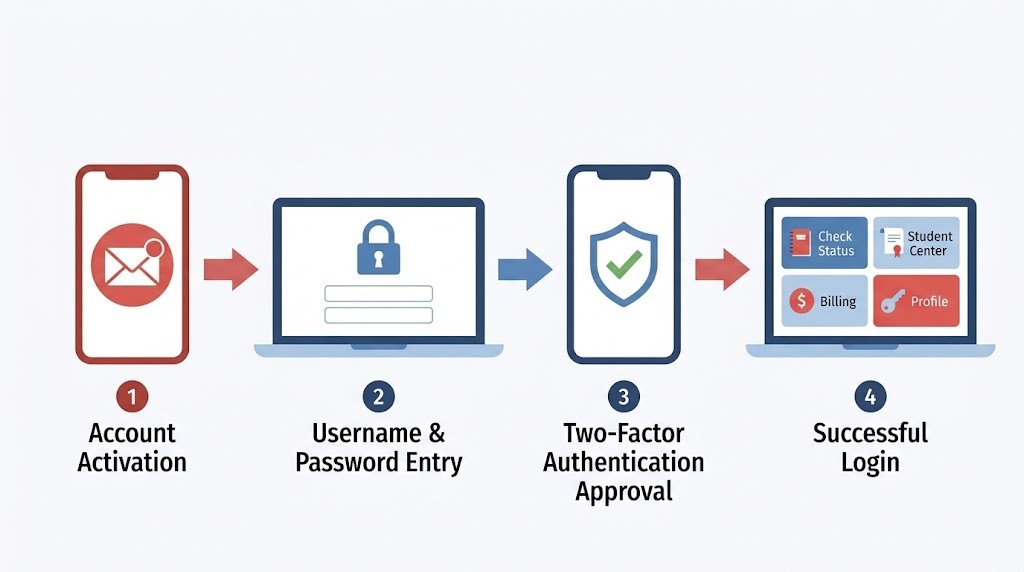
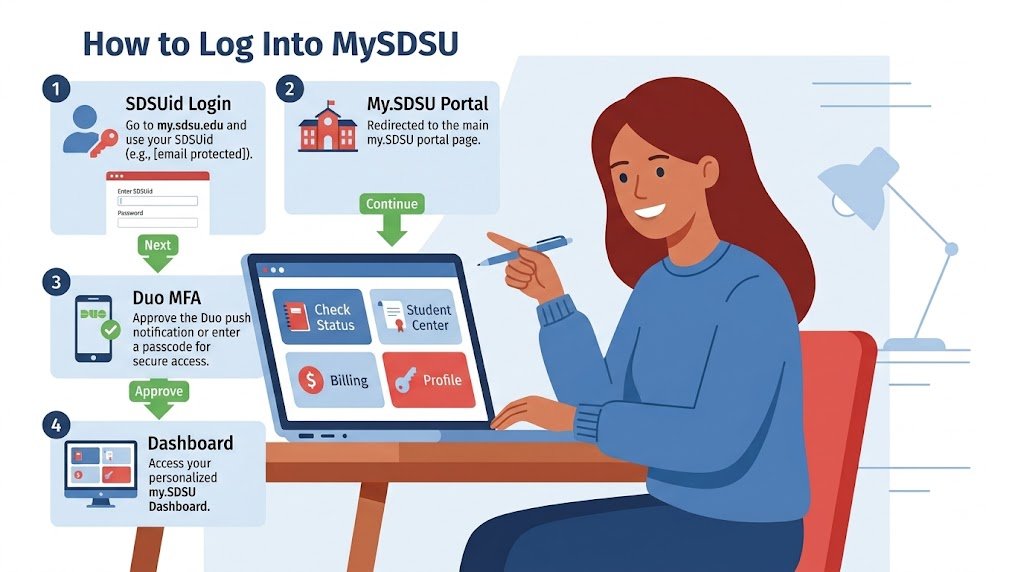
- Get your SDSUid first. Within about two weeks of submitting your Cal State Apply application, SDSU emails your personal address with your SDSUid and activation instructions. Your SDSUid is the same as your SDSU email address (it ends in @sdsu.edu), so don’t search for a separate “sdsu email address” system — they’re identical.
- Activate your account before your first login. Follow the activation link in that email and set a password that meets SDSU’s complexity requirements — a minimum of 10 characters, mixing letters, numbers, and symbols.
- Go to my.sdsu.edu directly. Avoid searching “SDSU login” on Google and clicking the first result, since outdated or third-party pages sometimes rank above the official site. Select the my.SDSU Login button in the top right corner.
- Enter your SDSUid and password, then complete Duo authentication. SDSU requires Duo Multi-Factor Authentication (MFA) on every login unless you’re already signed into another SDSU service like Canvas or Gmail in the same browser session.
- Choose whether to stay signed in. If you’re on a personal device, staying signed in speeds up future visits. On a shared or public computer, always sign out completely when you’re done.
- Navigate using the homepage tiles. Once inside, you’ll see tiles for Financial Aid, Degree Evaluation, Enrollment, and more — this tile-based layout is intentional and mirrors the CSU-wide PeopleSoft design.
- Bookmark my.sdsu.edu specifically, not a search result. Students who search “sdsu canvas student login” or “mysdsu” repeatedly often land on outdated cached pages; going straight to the source avoids that entirely.
- If login fails, use the “Can’t access your account?” recovery link on the sign-in page rather than creating a new account or repeatedly guessing your password, which can trigger a temporary lockout.
If none of these steps resolve your issue, the SDSU Library Computing Hub provides in-person and Zoom-based troubleshooting for SDSUid and login problems — a faster fix than waiting on a generic help-desk email.
What to Do If MySDSU Won’t Load or Times Out
Sometimes the issue isn’t your password at all — it’s your browser or network. Before assuming your account is broken, try these quick fixes:
- Switch browsers or use private/incognito mode. Cached login data from an old session is one of the most common causes of a stuck Degree Evaluation tile or a login loop.
- Clear cookies for sdsu.edu domains specifically, rather than wiping your entire browser history, which is faster and less disruptive.
- Disconnect from campus VPN if you’re already on campus Wi-Fi. Running both at once occasionally causes authentication conflicts with Duo.
- Check SDSU’s network status page if multiple services (Canvas, email, MySDSU) are down at the same time — that’s a sign of a campus-wide outage, not an individual account problem.
- Wait out registration-day traffic spikes. During the first hour of a new registration window, thousands of students hit MySDSU simultaneously, which can slow load times even when nothing is actually broken.
MySDSU Myths vs Facts
Myth: MySDSU, Canvas, and SDSU email all require separate passwords. Fact: They all use the same SDSUid credentials. If you’re logged into one, you often won’t be prompted to log into the others in the same session.
Myth: The Bursar’s Office only communicates by phone. Fact: The University Bursar’s Office primarily handles student finance questions through the Cal Coast Student Financial Center on Zoom rather than a dedicated phone line, so calling repeatedly often wastes time compared to using their scheduled virtual service.
Myth: You need a separate login for your degree evaluation. Fact: Degree evaluation is a tile inside MySDSU, not a standalone site — no extra “sdsu degree evaluation login” credentials exist.
Myth: Admissions decisions and MySDSU are unrelated. Fact: SDSU releases admission decisions directly inside MySDSU, not by a separate email announcement, so applicants must log in regularly to check status rather than waiting for a notification alone.
Myth: Forum threads on sites like Reddit reflect official SDSU policy. Fact: Communities discussing “sdsu admissions reddit” experiences are useful for anecdotes and moral support, but only SDSU’s official admissions and MySDSU pages reflect current, binding deadlines and requirements.
Myth: Your SDSU email and MySDSU account get deleted the moment you stop attending. Fact: Graduates keep their SDSUid, email, and associated accounts for 365 days after graduation, while students who stop attending without finishing a degree keep access for 90 days after their last enrolled semester.
Myth: You can install Microsoft 365 apps for free forever, even after leaving SDSU. Fact: Currently enrolled students get free Microsoft 365 installs on up to five devices, but once you graduate or leave, the software shifts into limited functionality unless you purchase a personal license — your files stay intact, but full editing access ends.
Expert Tips and Best Practices for Using MySDSU
- Check MySDSU weekly during registration and billing periods, not just when you get an email — some holds don’t trigger a notification until they’ve already affected your access.
- Update your personal email and phone number every semester so password recovery options actually work if you get locked out.
- Use a password manager for your SDSUid since it unlocks nearly every university service; a compromised MySDSU password is a much bigger risk than a single forgotten site login.
- Set your MySDSU homepage tiles to match your priorities each term — during financial aid season, keep that tile visible; during registration, prioritize the Enrollment tile.
- Clear your browser cache if the Degree Evaluation tile fails to load — this is a documented, common fix rather than a sign of a broken account.
- Set up multiple Duo recovery options, not just one phone number, since losing access to your only MFA device can lock you out during registration week when you can least afford it.
- Log into MySDSU right after applying, not just after being admitted — application status, missing document requests, and admissions communications all route through the same system.
- Screenshot your registration appointment time as soon as it posts, since enrollment windows are the single most time-sensitive piece of information on the entire portal.
- Use the Navigate tool to book advising appointments early in the semester, before the pre-registration rush fills every available slot.
- Treat your SDSUid password with the same seriousness as a banking password — it protects your financial aid disbursements, tuition payments, and academic records in one login.
Frequently Asked Questions About MySDSU
What is my SDSUid, and is it the same as my SDSU email address? Yes. Your SDSUid is identical to your official SDSU email address, and both end in @sdsu.edu. It’s the single credential used to log into MySDSU, Canvas, SDSU Gmail, and Microsoft 365. You don’t need to memorize separate usernames for each system — one login, once activated, works everywhere.
How do I access SDSU Canvas, and why does searching for it sometimes lead to the wrong page? The correct SDSU Canvas login page is canvas.sdsu.edu. SDSU’s own help documentation specifically warns that generic Google searches for “SDSU Canvas” can surface an incorrect login page instead of the official one, so bookmarking the direct URL is the safest approach. You’ll log in using the same SDSUid credentials as MySDSU.
When are SDSU admissions deadlines, and how do I check my application status? SDSU’s freshman filing period typically runs October 1 through early December for the following fall term, following the standard CSU application cycle. Admission decisions are posted directly inside MySDSU, not sent as a standalone email, so applicants should log in regularly rather than waiting for a separate notification. Deadlines shift slightly year to year, so always confirm exact dates on SDSU’s official admissions page.
How do I contact the SDSU Bursar’s Office about a billing question? The University Bursar’s Office primarily handles questions through the Cal Coast Student Financial Center, accessible via a scheduled Zoom session, rather than a dedicated public phone line. Office hours run Monday through Friday, 9:00 a.m. to 3:30 p.m. Pacific, and the office is physically located in Student Services West, Room 2536. For general campus contact, SDSU’s main line is 619-594-5200.
Do I need a separate account for SDSU’s Microsoft 365 and email services? No. Your SDSUid gives you access to Microsoft 365 (Word, Excel, PowerPoint, OneDrive) through m365.cloud.microsoft or portal.office.com, using the exact same login as MySDSU. Students can install Microsoft 365 apps on up to five personal devices at no cost for as long as they’re currently enrolled.
Where can I find real student opinions about SDSU admissions and MySDSU issues? Communities discussing “sdsu admissions reddit” experiences can be a useful, informal source of firsthand stories about wait times, financial aid quirks, or registration headaches. That said, treat them as anecdotes rather than official guidance — deadlines, requirements, and portal features change from year to year, so always cross-check anything you read against SDSU’s official admissions and MySDSU pages before acting on it.
What should I do if I forget my SDSUid password and can’t log into MySDSU? Go to the MySDSU or Microsoft 365 login page and select “Can’t access your account?” below the sign-in button — this only appears while you’re signed out. You’ll be walked through your saved recovery options, such as a secondary email or phone number. If none of your recovery methods work, SDSU’s Library Computing Hub can verify your identity in person or over Zoom and resend your activation email.
Is there a MySDSU mobile app, or do I have to use a browser? MySDSU itself is built to be mobile-responsive, meaning it works through your phone’s browser without needing a dedicated app. Canvas, by contrast, does have a separate mobile app available for iOS and Android, which many students prefer for checking grades and assignments on the go while still using a browser for MySDSU tasks like registration and billing.
Why does MySDSU keep asking me to log in again, even on the same device? This usually happens because your Duo session or browser cookies expired, which SDSU sets intentionally as a security measure given how much sensitive financial and academic data MySDSU holds. If you’re being prompted unusually often on a personal device you trust, check that you’re allowing cookies for sdsu.edu domains and consider selecting “stay signed in” during login, which extends your session length without compromising the underlying MFA protection.
Final Verdict
MySDSU isn’t just another login screen — it’s the operational backbone of your entire SDSU experience, from the moment your admissions decision posts to the day you check your final degree evaluation before graduation. The biggest source of student confusion isn’t the portal itself; it’s not realizing that Canvas, SDSU email, Microsoft 365, and MySDSU all share one identity: your SDSUid.
Three things to remember: your SDSUid is your SDSU email address, your degree evaluation lives inside MySDSU rather than a separate site, and the Bursar’s Office prefers Zoom over phone calls for student finance questions. Once those three facts click, the rest of the portal becomes far easier to navigate.
If you’re a new or incoming student, activate your SDSUid today if you haven’t already, and bookmark my.sdsu.edu directly instead of relying on search results. Set up your Duo recovery options now, before an emergency login attempt forces you to scramble during finals week or the first day of registration. The five minutes it takes to double-check your recovery phone number and personal email on file could save you a genuinely stressful afternoon later in the semester.
Have you run into a MySDSU login issue this guide didn’t cover, or found a workaround that saved you time during registration? Drop a comment below and let other students know what worked for you. Share this guide with an incoming Aztec who’s about to register for their first semester, and check out our related guide on navigating SDSU financial aid for what to do once you’re logged in.